How Nunc Configuration Works
All governance in Nunc is configured once in console.nunc.cloud and enforced identically across Data Studio Web, all five MCP endpoints, Slack/Teams, Sidecar, and @nunc/sdk.
1. The 5-layer configuration evaluation order
Every user prompt, SQL query, and MCP tool invocation passes through five configuration layers in sequence:
| Layer | Console Screen | Settings Controlled | Runtime Effect |
|---|---|---|---|
| 1. Identity & Groups | Organization -> Users | SAML/OIDC SSO, SCIM group sync, and Console roles (Admin, Builder, Member). | Establishes caller.user_id, caller.email, and caller.groups[] on every request. |
| 2. Workspaces & Knowledge | Resources -> Workspaces / Knowledge | Department boundaries, 4-tier vector collections (Public, Org, Workspace, Agent), paired Slack/Teams channels. | Scopes retrieval indices, memory persistence, and visible workspace agents. |
| 3. Connectors & Table Scope | Build -> Integrations | Org-shared vs per-user OAuth credentials, warehouse DSNs, per-table Allow / Scope to User / Block rules. | Determines which upstream tools exist and injects row predicates into SQL ASTs. |
| 4. Access & PBAC Policies | Organization -> Access | Default-deny tool rules (allow, require-approval, deny) at User > Group > Organization priority. | Computes effective_tools = pbac(caller) ∩ agent.tools; pauses gated writes. |
| 5. Guardian & Model Settings | Trust -> Security & Account -> Settings | Sensitivity tier (Strict / Medium / Permissive), 17 PII detectors, custom regex, egress allowlist, model budgets. | Inspects prompts/outputs inline, tokenizes or redacts PII, and blocks unlisted egress. |
2. Connect integrations & scope database tables
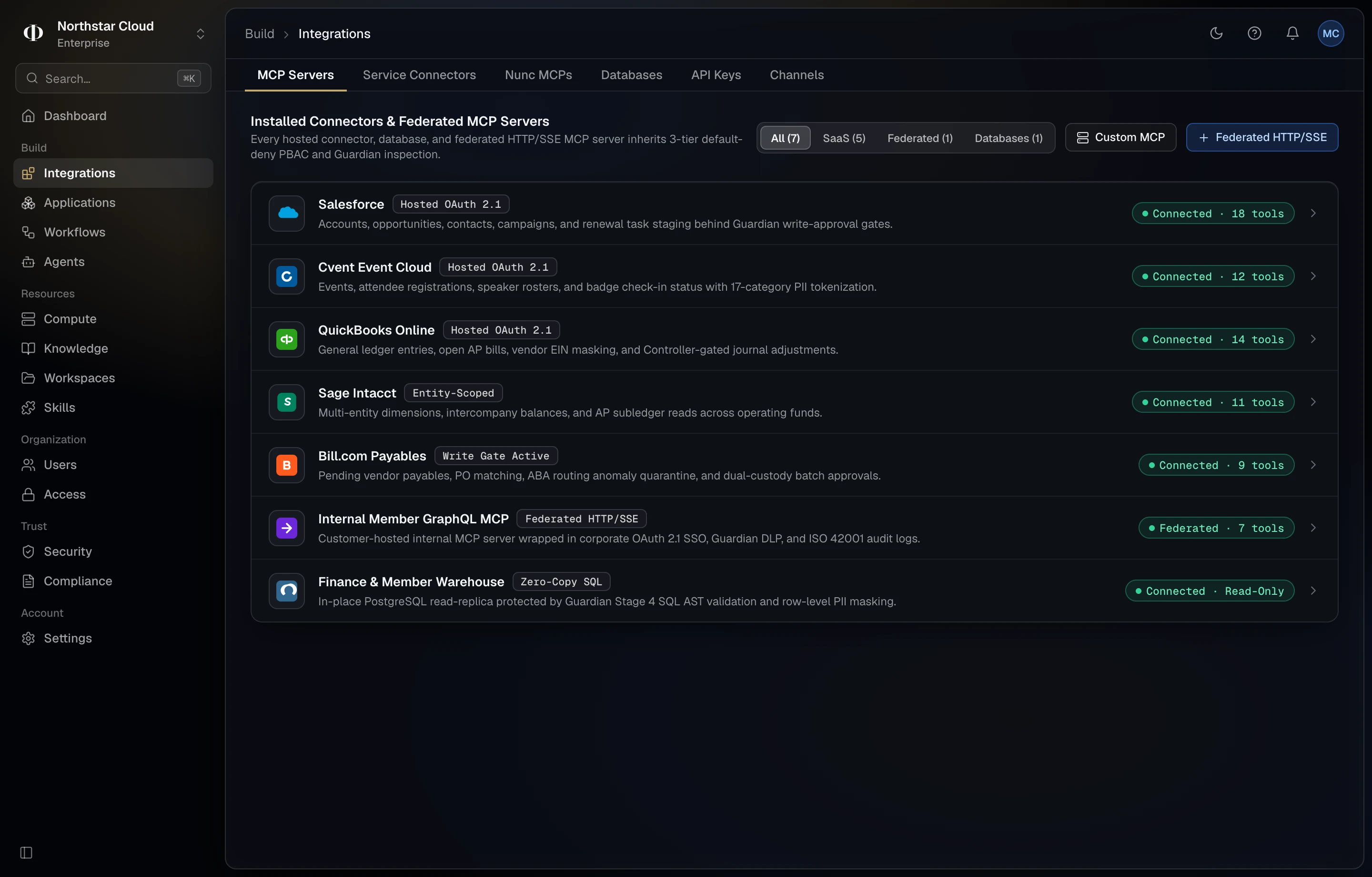
In Console → Build → Integrations, choose between two authentication models depending on the upstream system:
- Organization-shared credentials: For SQL warehouses (Snowflake, PostgreSQL, BigQuery) and shared ERPs (Sage Intacct, QuickBooks, Bill.com). Provision a dedicated read-only database role first, paste the DSN/key-pair into Console, and enforce per-table row scoping above it.
- Per-user OAuth 2.1 delegation: For personal mailboxes and workspaces (Microsoft Outlook, Gmail, Google Drive, GitHub, Jira). Each user authorizes their own OAuth grant once so AI queries respect upstream file and folder ACLs.
Provision a least-privilege warehouse role
-- PostgreSQL least-privilege read-only role for Nunc
CREATE ROLE nunc_readonly WITH LOGIN PASSWORD '<strong-random-password>';
GRANT CONNECT ON DATABASE prod_analytics TO nunc_readonly;
GRANT USAGE ON SCHEMA analytics TO nunc_readonly;
GRANT SELECT ON analytics.arr_movements, analytics.invoices, analytics.customer_accounts TO nunc_readonly;
ALTER ROLE nunc_readonly SET statement_timeout = '25s';
ALTER ROLE nunc_readonly SET default_transaction_read_only = on;-- Snowflake key-pair read-only role for Nunc
CREATE ROLE IF NOT EXISTS NUNC_READONLY;
GRANT USAGE ON WAREHOUSE NUNC_WH TO ROLE NUNC_READONLY;
GRANT USAGE ON DATABASE PROD_DW TO ROLE NUNC_READONLY;
GRANT USAGE ON SCHEMA PROD_DW.CORE TO ROLE NUNC_READONLY;
GRANT SELECT ON TABLE PROD_DW.CORE.INVOICES, PROD_DW.CORE.ACCOUNTS TO ROLE NUNC_READONLY;
CREATE USER IF NOT EXISTS NUNC_SVC RSA_PUBLIC_KEY='<rsa-public-key>' DEFAULT_ROLE=NUNC_READONLY;
GRANT ROLE NUNC_READONLY TO USER NUNC_SVC;Set per-table scoping rules
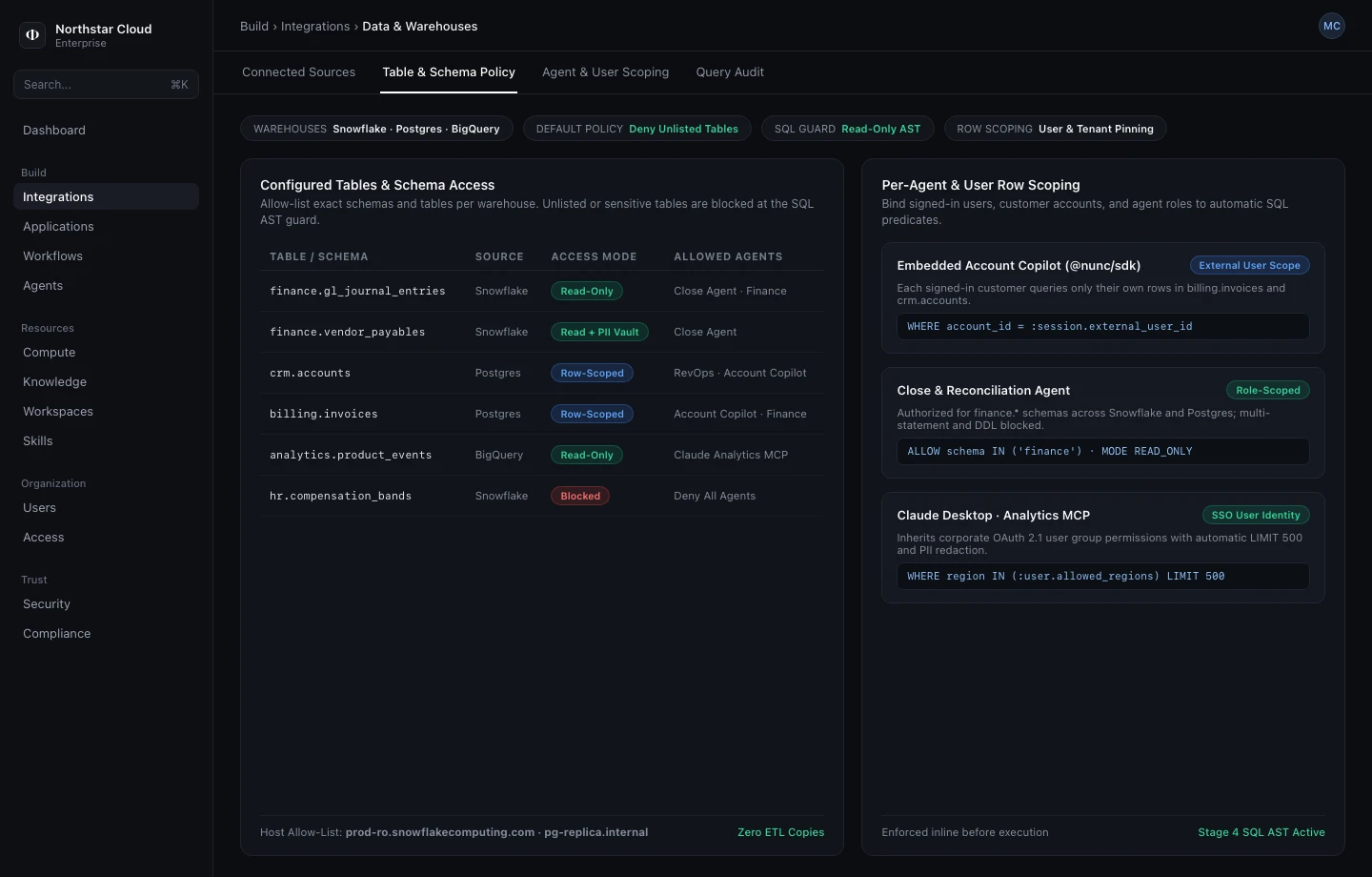
After connecting a warehouse, open its Table & Row Scope tab and assign every table one of three states:
Allow Agent— Permitted users and agents can execute read-onlySELECTqueries across the table; Guardian still masks PII columns.Scope to User— Bind a row-owner column (for example,owner_email = :caller.emailoraccount_id = :caller.account_id). Nunc parses every SQL query into an AST and injects thatWHEREpredicate before execution.Block— Hides the table fromnunc_analytics_discover_schemasand rejects any SQL referencing it with422 schema_mismatch.
3. Configure default-deny PBAC & write gates
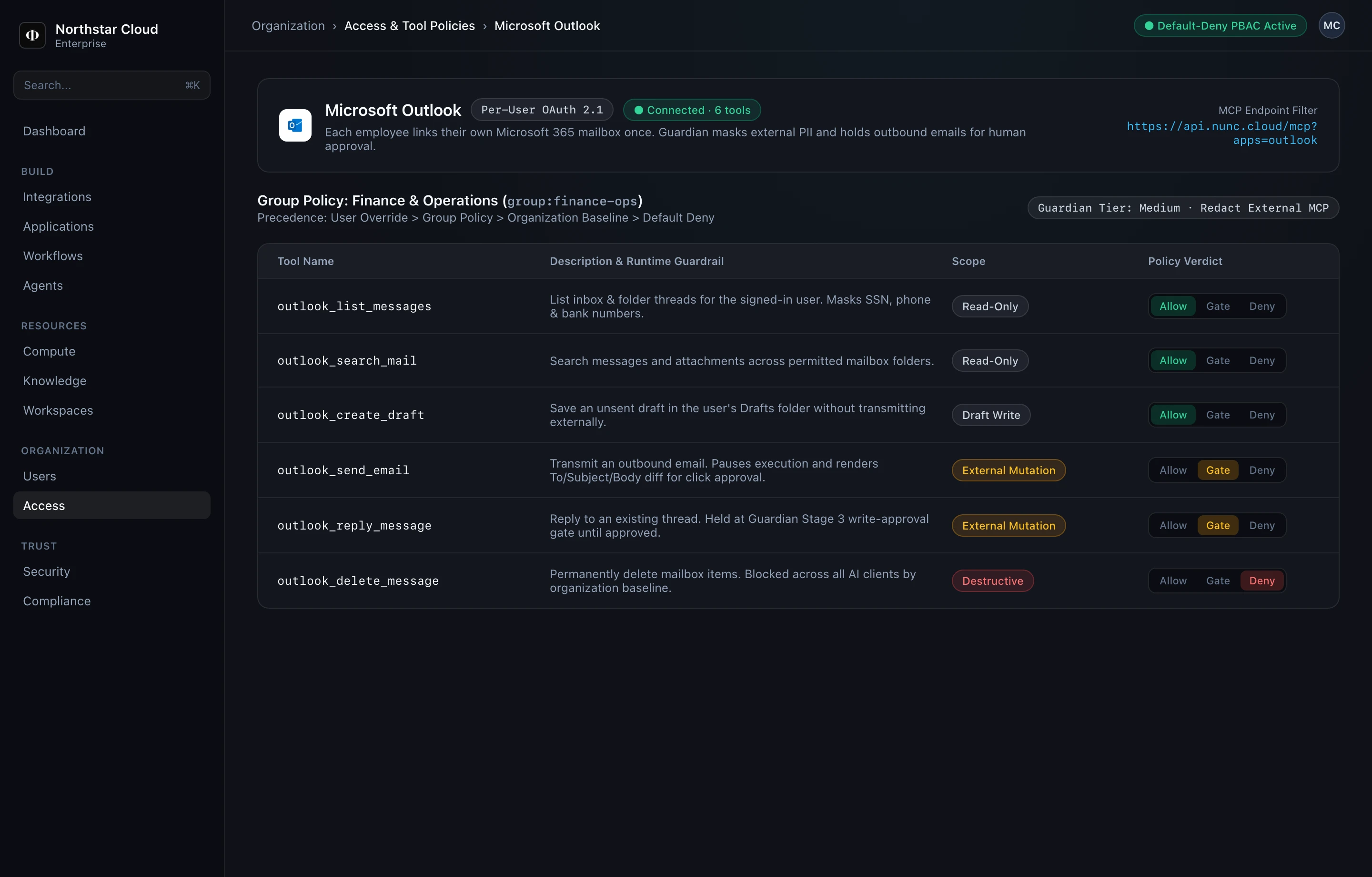
Enabling a connector exposes zero tools by default. Open Console → Organization → Access to assign Allow, Gate (Require Approval), or Deny rules. When a user invokes a specialist agent, Nunc computes the strict intersection so agents never escalate privileges:
# Evaluated top-down: User Override -> Group Policy -> Org Baseline -> Default Deny
[
  { "subject": "group:finance-ops", "pattern": "outlook_list_*",       "effect": "allow" },
  { "subject": "group:finance-ops", "pattern": "outlook_search_*",     "effect": "allow" },
  { "subject": "group:finance-ops", "pattern": "nunc_analytics_query", "effect": "allow" },
  { "subject": "group:finance-ops", "pattern": "outlook_send_*",       "effect": "require-approval" },
  { "subject": "group:finance-ops", "pattern": "outlook_reply_*",      "effect": "require-approval" },
  { "subject": "group:finance-ops", "pattern": "sage_intacct_create_*","effect": "require-approval" },
  { "subject": "org:*",             "pattern": "*_delete_*",           "effect": "deny" }
]
4. Configure Guardian PII & sensitivity tiers
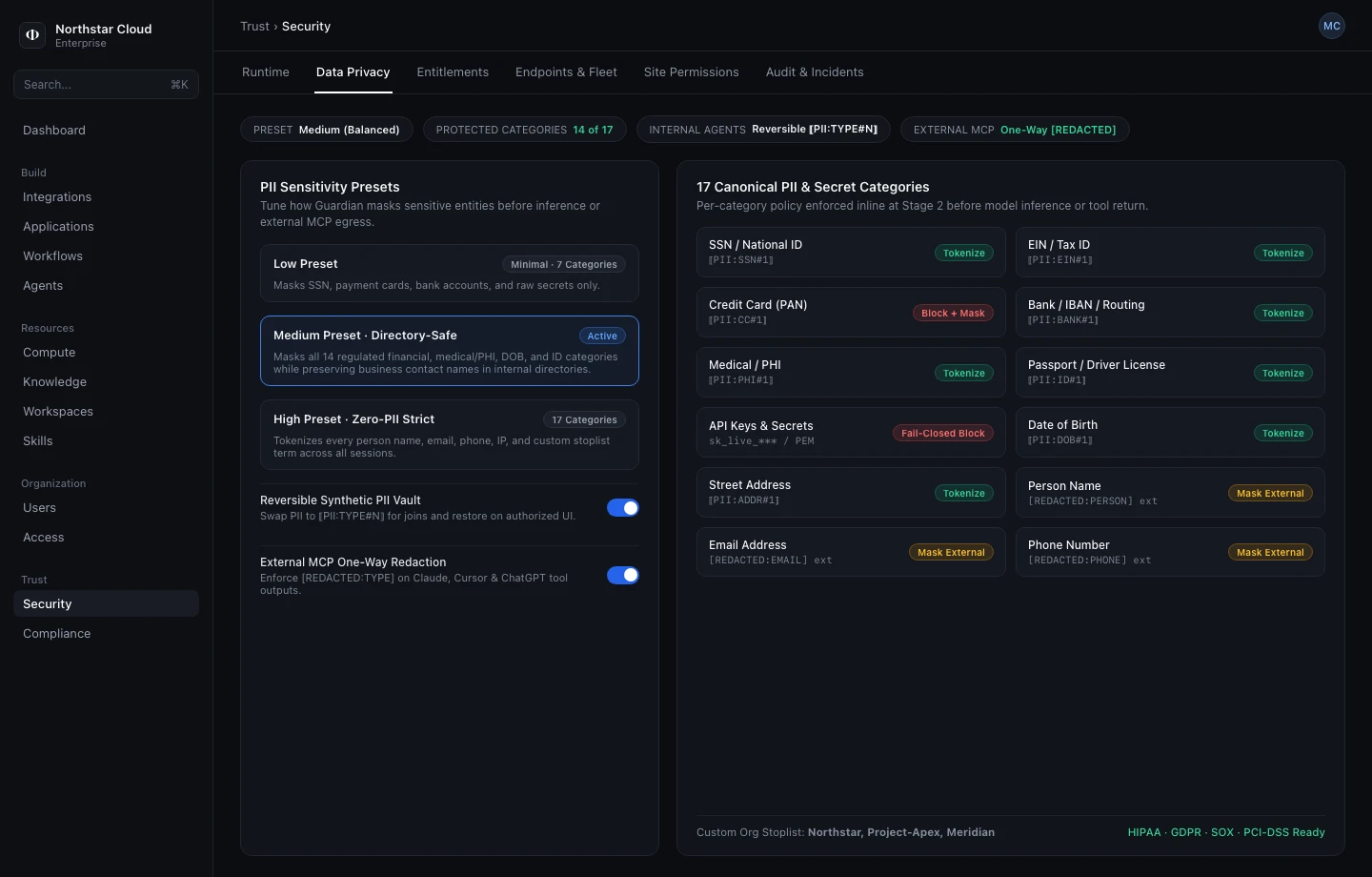
Open Console → Trust → Security → Data Privacy to choose your tenant preset and toggle individual PII/PHI detectors:
- Strict: Masks all 17 built-in PII/PHI categories + custom regex, blocks low-threshold injection patterns, gates all writes, and blocks unlisted egress domains.
- Medium (Default): Reversibly tokenizes SSNs, payment cards, MRNs, credentials, emails, and phone numbers in Data Studio; emits irreversible
[REDACTED:TYPE]masks to external MCP clients (Claude, ChatGPT, Cursor). - Permissive: Blocks API keys, private keys, and high-confidence jailbreaks while leaving business contact fields unmasked in internal engineering workspaces.
5. Bind external user claims in @nunc/sdk
When embedding Nunc into your own product or backend, generate a scoped API key in Console → Build → Applications and pass per-request caller claims so Scope to User SQL rules enforce per customer account. See @nunc/sdk Reference for full client options.
import { NuncClient } from "@nunc/sdk";

const nunc = new NuncClient({
  tenantUrl: process.env.NUNC_TENANT_URL!,
  apiKey: process.env.NUNC_API_KEY!, // Created in Console -> Build -> Applications
});

// Bind external customer claims for row-level SQL ("Scope to User") & workspace isolation.
// SDK options can tighten tenant policy (e.g. "medium" -> "strict"), never weaken Console rules.
const session = nunc.asExternalUser("cust_acme_88", {
  workspace: "client-portal",
  claims: { account_id: "cust_acme_88", region: "us-east" },
  guardianPreset: "strict",
});