Connect MCP Clients
Register Nunc's remote Streamable HTTP MCP endpoints in your AI client, sign in via OAuth 2.1 + SSO, grant tool permissions in Console, and invoke SaaS or warehouse tools (such as Microsoft Outlook, Salesforce, and Snowflake) behind Guardian PII masking and human write approvals.
1. Choose the MCP endpoint and optional URL filters
Register one or all five endpoints in the same client. Append ?apps=outlook,salesforce to /mcp, ?warehouse=prod_snowflake to /mcp/analytics, or ?workspace=finance-close to /mcp/memory and /mcp/delegate to keep each session scoped to the tools you need.
| Server | Endpoint URL | Tools Exposed |
|---|---|---|
| Tools MCP | https://api.nunc.cloud/mcp | Connected SaaS apps (Outlook, Gmail, Slack, Salesforce, Sage Intacct, Jira, GitHub) and paired Sidecar tools. Filter via ?apps=. |
| Analytics MCP | https://api.nunc.cloud/mcp/analytics | nunc_analytics_* — schema discovery, AST-validated read-only SQL, Studio report links, and action proposals. Pin via ?warehouse=. |
| Compute MCP | https://api.nunc.cloud/mcp/sandbox | Isolated Python, Bash, and TypeScript sandbox execution with staged file upload/download. |
| Memory MCP | https://api.nunc.cloud/mcp/memory | nunc_search_memory, nunc_ingest, nunc_recall_strategies across Public, Company, Workspace, and Agent tiers. |
| Delegate MCP | https://api.nunc.cloud/mcp/delegate | nunc_delegate, nunc_delegate_<slug>, nunc_delegate_status, nunc_delegate_stop. |
2. Add the endpoint to your AI client
Pick your server and client below to copy the exact CLI command or JSON config file:
Claude.ai & Claude Desktop
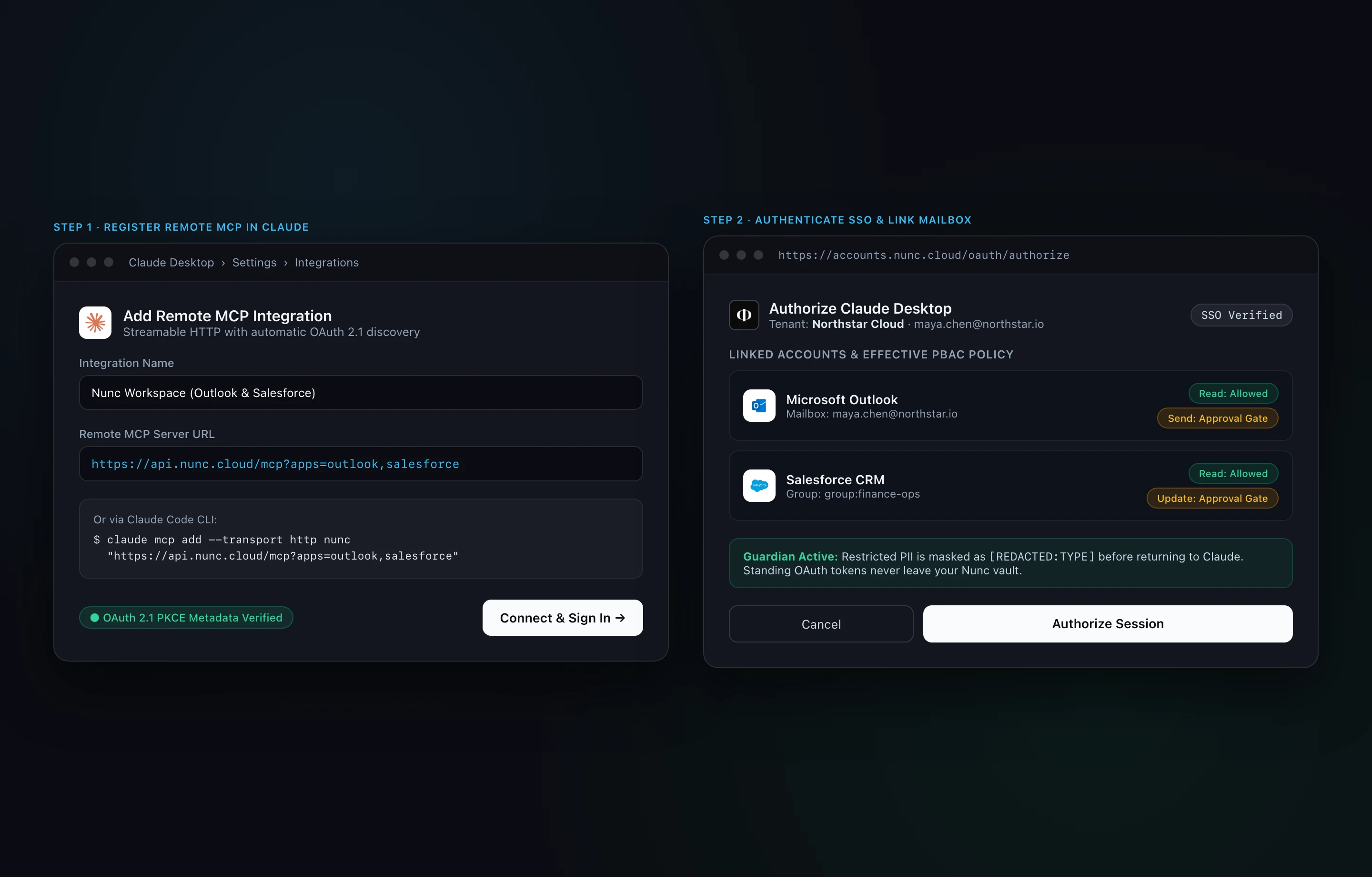
Open Claude Connectors- Open Settings → Connectors → Add Custom Connector in Claude.ai or Claude Desktop.
- Paste each URL below and click Connect.
- Sign in with your Nunc / company SSO account and select your organization on the consent screen.
https://api.nunc.cloud/mcphttps://api.nunc.cloud/mcp/memoryhttps://api.nunc.cloud/mcp/sandboxhttps://api.nunc.cloud/mcp/delegatehttps://api.nunc.cloud/mcp/analyticsClaude Code CLI
Register the remote HTTP server in Claude Code, then run /mcp inside a session to complete browser SSO:
claude mcp add --transport http nunc "https://api.nunc.cloud/mcp"
claude mcp add --transport http nunc-memory "https://api.nunc.cloud/mcp/memory"
claude mcp add --transport http nunc-sandbox "https://api.nunc.cloud/mcp/sandbox"
claude mcp add --transport http nunc-delegate "https://api.nunc.cloud/mcp/delegate"
claude mcp add --transport http nunc-analytics "https://api.nunc.cloud/mcp/analytics"
Deploying across an organization? See Claude MCP enterprise lock for MDM-managed managed-mcp.json provisioning.
3. Sign in via OAuth 2.1 and link per-user accounts
- Automatic OAuth discovery: When Claude Desktop, Claude Code, ChatGPT, Cursor, or VS Code connects to
api.nunc.cloudwithout a static header, Nunc returns OAuth 2.1 Protected Resource Metadata and opens your browser toaccounts.nunc.cloud. - Verify corporate SSO & link personal SaaS: Sign in with your corporate identity provider. For per-user connectors such as Microsoft Outlook, Google Drive, or GitHub, link your individual mailbox or account once on the consent screen. Standing OAuth refresh tokens stay encrypted in your Nunc tenant vault — they are never exposed to the AI client.
- Headless / CI alternative: For backend scripts or SDK runners without a browser, create a scoped key in Console → Build → Integrations → API Keys and pass
Authorization: Bearer nunc_....
4. Enable connectors and grant tool access in Console
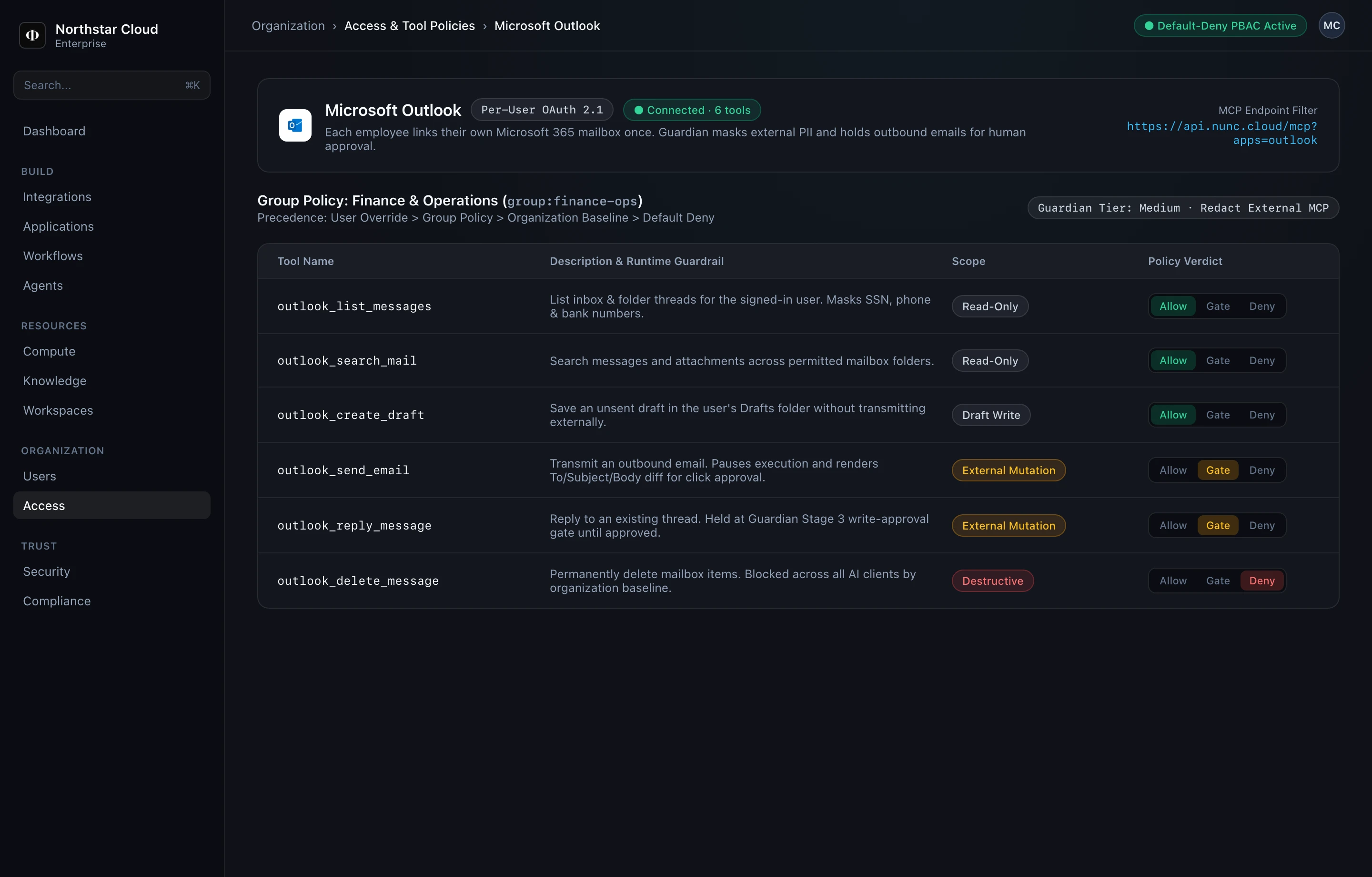
- Open Console → Build → Integrations and enable the connector (for example, Microsoft Outlook).
- Open Console → Organization → Access and select the target SSO group (for example,
group:finance-ops) or individual user. - Set read-only tools (
outlook_list_messages,outlook_search_mail) to Allow, set outbound mutations (outlook_send_email,outlook_reply_message) to Gate (Require Approval), and keep destructive actions (outlook_delete_message) set to Deny.
5. Walkthrough: Reading and replying to Outlook email from Claude
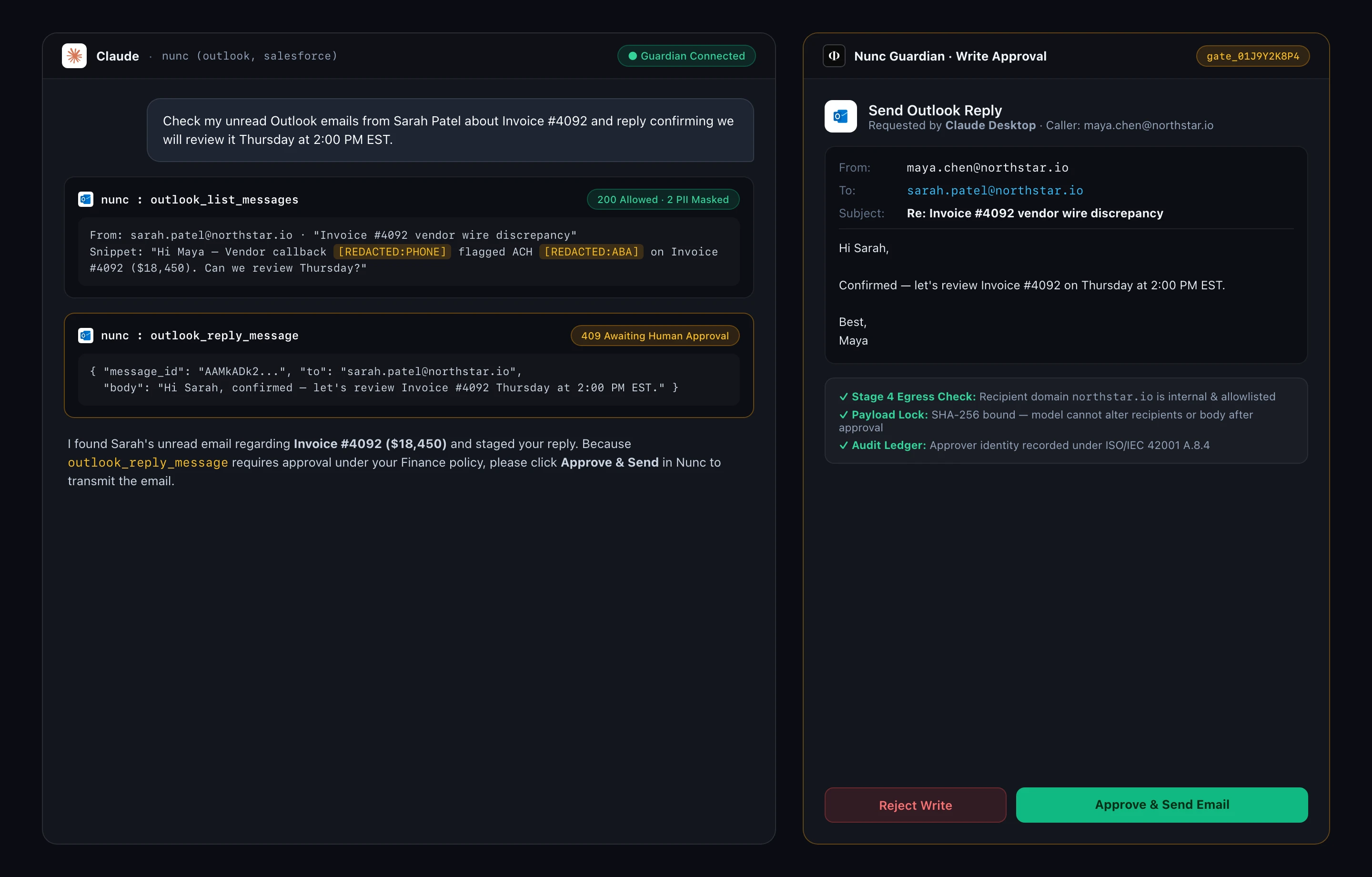
Once connected and permitted, here is what happens at runtime when a user asks Claude to check unread Outlook threads and send a reply:
- Read tool executes with inline PII redaction: Claude calls
outlook_list_messages. Guardian verifiesmaya.chen@northstar.iohasAllowpermission, fetches her unread messages, and replaces sensitive vendor phone and ACH routing numbers with[REDACTED:PHONE]and[REDACTED:ABA]before the response reaches Claude's context window. - Write tool pauses at Guardian Stage 3 Approval Gate: Claude calls
outlook_reply_messagewith the proposedtoandbody. Because the tool is set toGate, Nunc holds the call (409 Awaiting Human Approval) and creates a SHA-256 payload-locked approval request. - Human reviews and clicks Approve & Send: Maya inspects the exact recipient, subject, and email body in Nunc (via Console, Studio, or Slack notification) and clicks Approve & Send Email. Nunc transmits the locked payload via Microsoft Graph and writes the approval record to the ISO/IEC 42001 audit ledger.
6. Next steps & enterprise rollout
- How Nunc Configuration Works — Configure warehouse read-only SQL roles, row-level
Scope to Userrules, and Guardian sensitivity presets. - Lock Claude MCP via MDM — Deploy root-owned
managed-mcp.jsonandmanaged-settings.jsonso staff workstations connect exclusively through Nunc. - Install Nunc Sidecar — Bridge approved local folders and workstation CLIs on macOS or Windows into
/mcp.