Nunc GuardianDefault-Deny PBAC · Human Write-Approval Gates
Tool Policies & Approvals (PBAC)
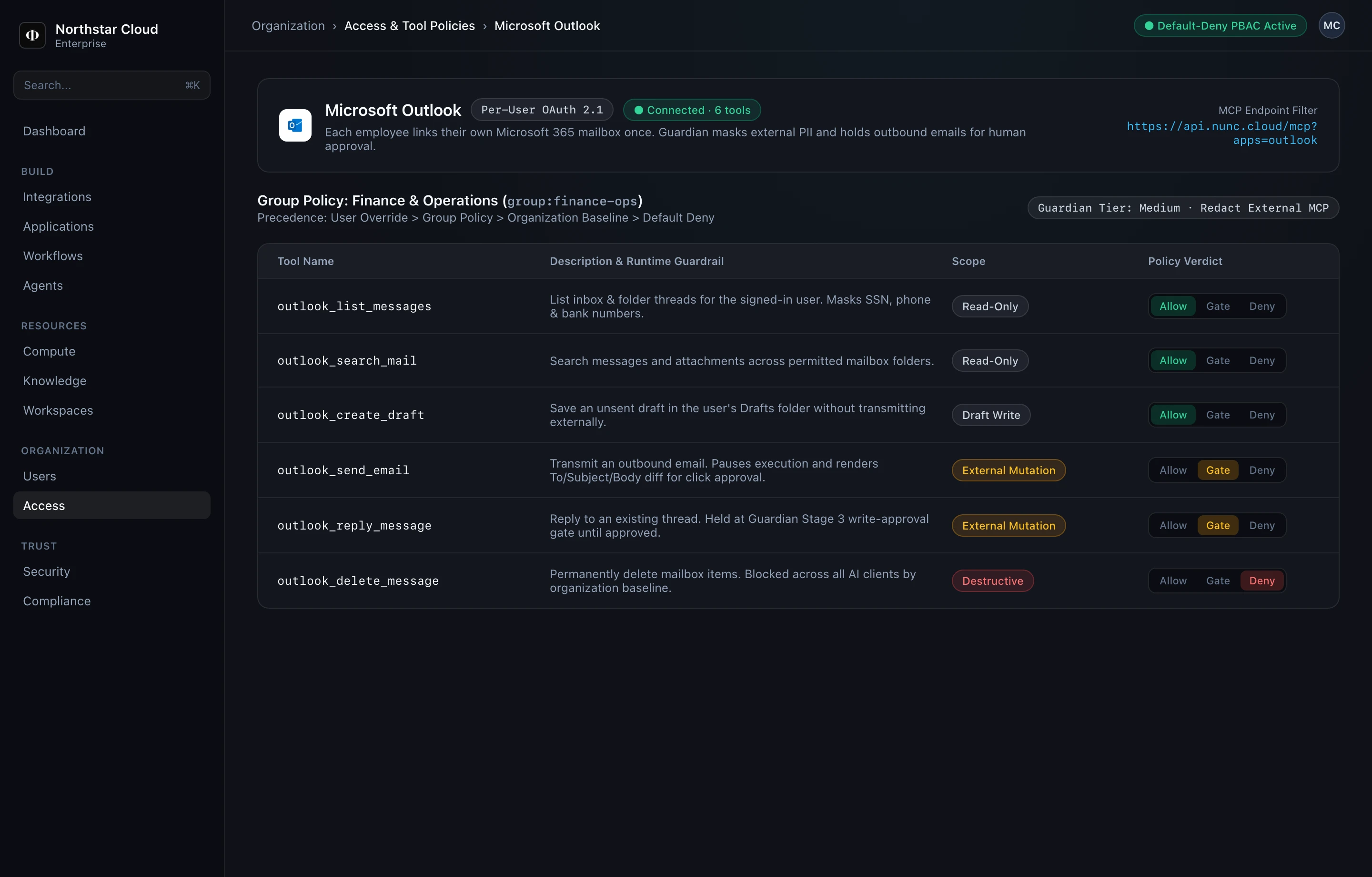
Connecting an integration never exposes tools automatically. Every tool call across Data Studio Web, MCP clients, Slack/Teams, and @nunc/sdk evaluates against your 3-tier default-deny policy engine in Console → Organization → Access.
1. Assign tool permissions in Console
- Open Console → Organization → Access and select the target scope: an individual User, an SSO Group (for example,
group:finance-ops), or the Organization Baseline. - Select a connected integration (such as Microsoft Outlook, Salesforce, or Sage Intacct).
- Set each tool (or wildcard namespace) to one of three verdicts:
- Allow: Executes immediately after Guardian input and PII checks. Recommended for read-only lookups (
list_*,get_*,nunc_analytics_query). - Gate (Require Approval): Holds the call (
409 Awaiting Approval), locks the SHA-256 payload hash, and waits for an authorized human to click Approve. Recommended for all writes and external messages (send_*,reply_*,create_*,update_*). - Deny: Hard-blocks destructive operations (
*_delete_*) regardless of prompt or agent instructions.
- Allow: Executes immediately after Guardian input and PII checks. Recommended for read-only lookups (
2. Policy evaluation order
| Priority | Tier | Evaluation Behavior |
|---|---|---|
| 1 (Highest) | User Override | Explicit allow, gate, or deny bound to a single user or application key. |
| 2 | Group Policy | Department rules mapped from SAML/SCIM groups (e.g. Finance, RevOps, Engineering). |
| 3 | Organization Baseline | Tenant-wide baseline rules (such as global *_delete_* -> Deny). |
| Fallback | Default Deny | If no rule matches at any tier, the tool is hidden from discovery and rejected at runtime. |
# Evaluated in strict priority: 1. User -> 2. Group -> 3. Organization -> 4. Default Deny
outlook_list_*           -> Allow             (group:finance-ops)
outlook_search_*         -> Allow             (group:finance-ops)
outlook_send_*           -> Gate (Approval)   (group:finance-ops)
outlook_reply_*          -> Gate (Approval)   (group:finance-ops)
salesforce_get_*         -> Allow             (group:revops)
salesforce_update_*      -> Gate (Approval)   (group:revops)
*_delete_*               -> Deny              (org:*)
3. How human write approvals execute at runtime
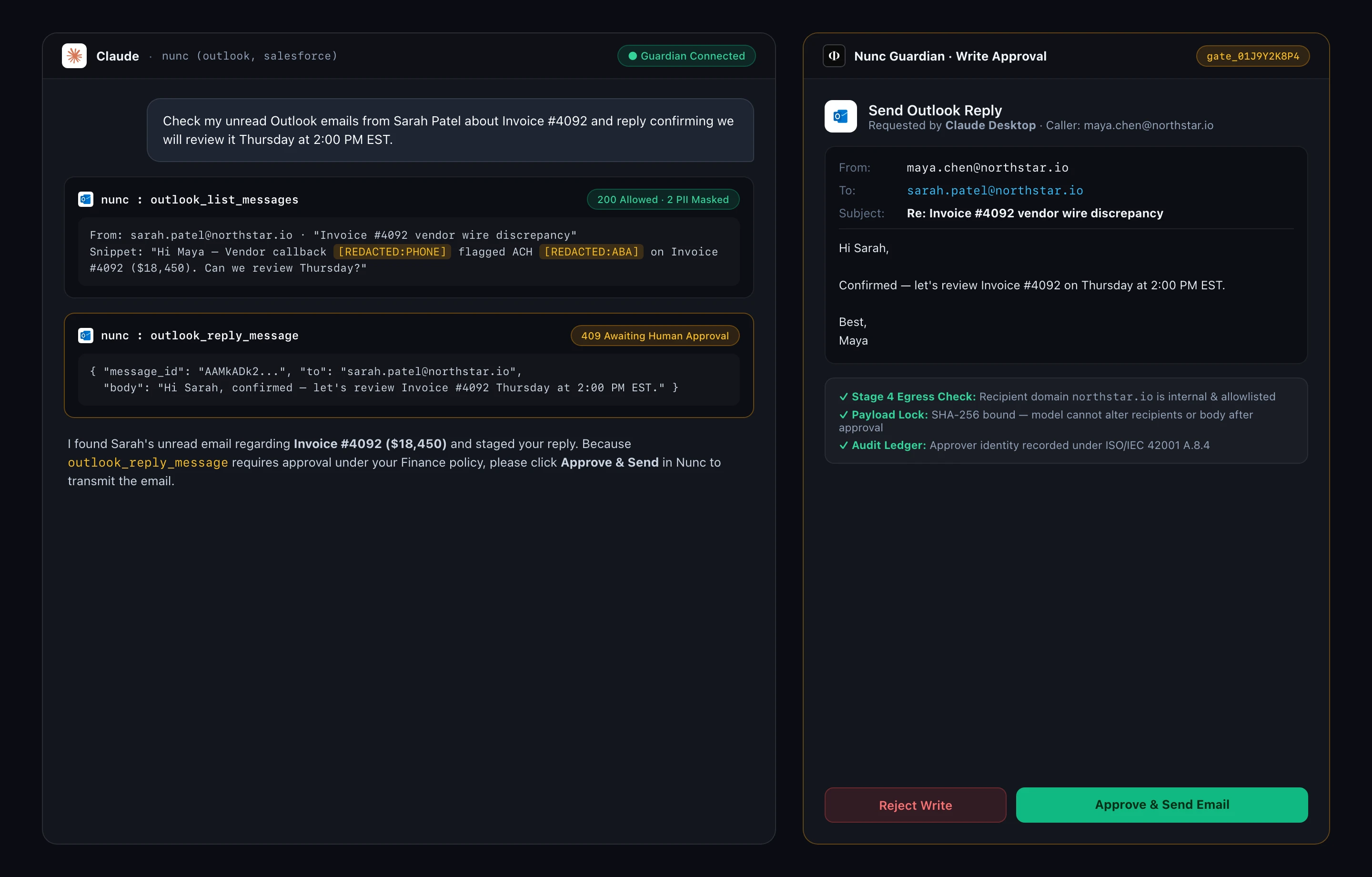
When an external MCP client (such as Claude Desktop) calls a gated tool like outlook_reply_message, Nunc holds the outbound API request and surfaces an approval diff bound by SHA-256 so the model cannot swap recipients or amounts after approval:
Related: How Nunc Configuration Works · Configure Guardian Firewall