Getting StartedEnd-User Runbook · Studio · Claude MCP · Slack · Approvals
Using Nunc: User & Team Guide
Once an administrator configures your organization in Nunc Console, team members can query governed data, invoke SaaS tools such as Microsoft Outlook and Salesforce, and approve write actions across four surfaces.
1. Pick the surface for your task
| Surface | Entry Point | PII Handling | When to Use |
|---|---|---|---|
| Data Studio Web | https://studio.nunc.cloud | Reversible session tokens (⟦PII:TYPE#N⟧) | Live SQL dashboards, 16:9 executive decks, spreadsheets, multi-step workflows, and document review. |
| External AI Clients (MCP) | https://api.nunc.cloud/mcp* | One-way redaction ([REDACTED:TYPE]) | Calling governed SaaS tools (e.g. Outlook, Salesforce, Slack), warehouse SQL, sandboxes, and specialist agents from Claude, ChatGPT, or Cursor. |
| Slack & Microsoft Teams | @Nunc in paired channels | Channel policy mask | Asking workspace agents questions in-thread and clicking Approve / Reject on gated write actions. |
| Embedded & Backend (@nunc/sdk) | npm install @nunc/sdk | Per-account isolated session | Embedding customer-facing copilots and automating backend runs scoped to an external account ID. |
2. Use SaaS & warehouse tools from Claude, ChatGPT, or Cursor
- Register the MCP URL: Add
https://api.nunc.cloud/mcp(or a filtered URL like?apps=outlook,salesforce) in Claude Desktop Settings or viaclaude mcp add(see Connect MCP Clients). - Complete SSO & link personal accounts once: On first connection, sign in via your corporate SSO in the browser popup and link personal OAuth apps (Microsoft Outlook, Gmail, Google Drive, GitHub) if needed.
- Prompt normally: Ask Claude to read messages, look up CRM records, or run read-only SQL. Guardian masks restricted PII inline as
[REDACTED:TYPE]before returning tool results to external AI models. - Approve any outbound write: When Claude proposes sending an email, updating a CRM stage, or creating a payable batch, Nunc pauses the call and shows you the exact diff to approve or reject.
https://api.nunc.cloud/mcp?apps=outlook,salesforce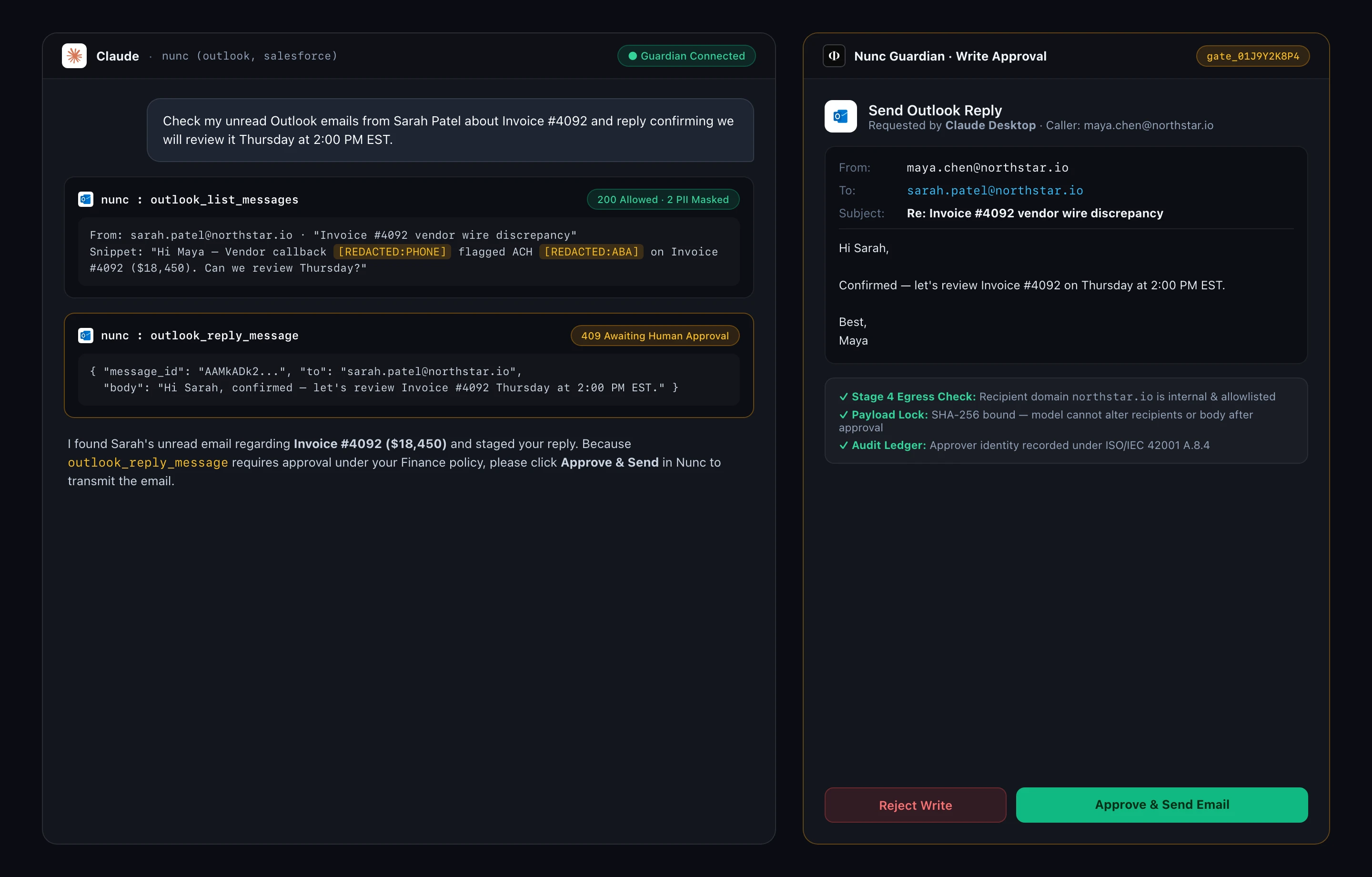
# 1. Expose only Outlook and Salesforce tools in this chat session
https://api.nunc.cloud/mcp?apps=outlook,salesforce

# 2. Bind Analytics MCP to a specific warehouse connection
https://api.nunc.cloud/mcp/analytics?warehouse=prod_snowflake

# 3. Scope Memory and Specialist Agents to your Finance Close workspace
https://api.nunc.cloud/mcp/memory?workspace=finance-close
https://api.nunc.cloud/mcp/delegate?workspace=finance-close
# Claude / Cursor with /mcp (Outlook Read + Approval-Gated Reply)
"Check my unread Outlook emails from Sarah Patel about Invoice #4092 and reply confirming Thursday at 2:00 PM EST."
# Data Studio Web or /mcp/analytics (Read-Only SQL + 16:9 Deck)
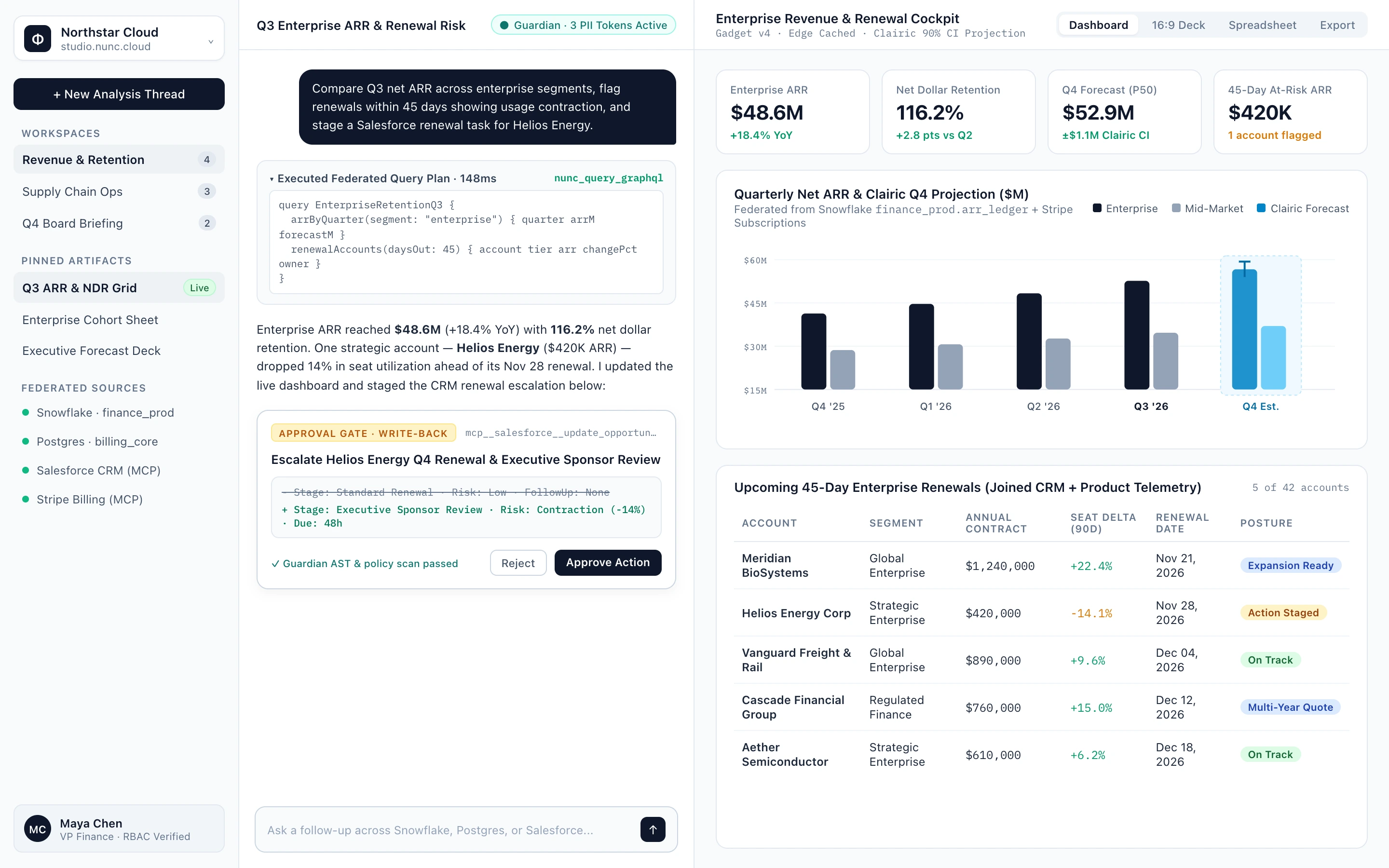
"Query prod_snowflake for Q4 net retention by segment, compare against Q3, and open as a 16:9 board deck."
# Claude / Cursor with /mcp/delegate (Specialist Agent Handoff)
"Use nunc_delegate_close_reconciliation in workspace finance-close to match October Bill.com payouts against Sage Intacct GL 2000."3. Analyze data & build decks in Data Studio Web
- Open
https://studio.nunc.cloudand sign in with your corporate SSO account. - Select your team Workspace in the top-left switcher so your workspace knowledge, specialist agents, and permitted warehouse tables load.
- Pick Ask (fast read-only Q&A), Work (multi-step tool orchestration), Code (isolated Python/TypeScript sandbox), or a published Private Agent.
- Switch any output between Dashboard, 16:9 Deck, Spreadsheet, or Executive Memo. Because Data Studio runs inside your tenant boundary, Guardian uses reversible placeholders (
⟦PII:EMAIL#1⟧) that re-hydrate only inside authorized user sessions.
4. Use @Nunc in Slack or Microsoft Teams
- Mention
@Nuncfollowed by your question in any channel paired to a Workspace, or use@Nunc /agent <slug>to target a specialist agent. - Every tool call inside a shared channel still evaluates against the message sender's individual PBAC permissions — teammates cannot bypass access rules through a shared Slack thread.
- When a workflow or MCP session hits a write gate, approvers can inspect the payload diff and click Approve or Reject directly in Slack/Teams or in Console → Trust → Security.